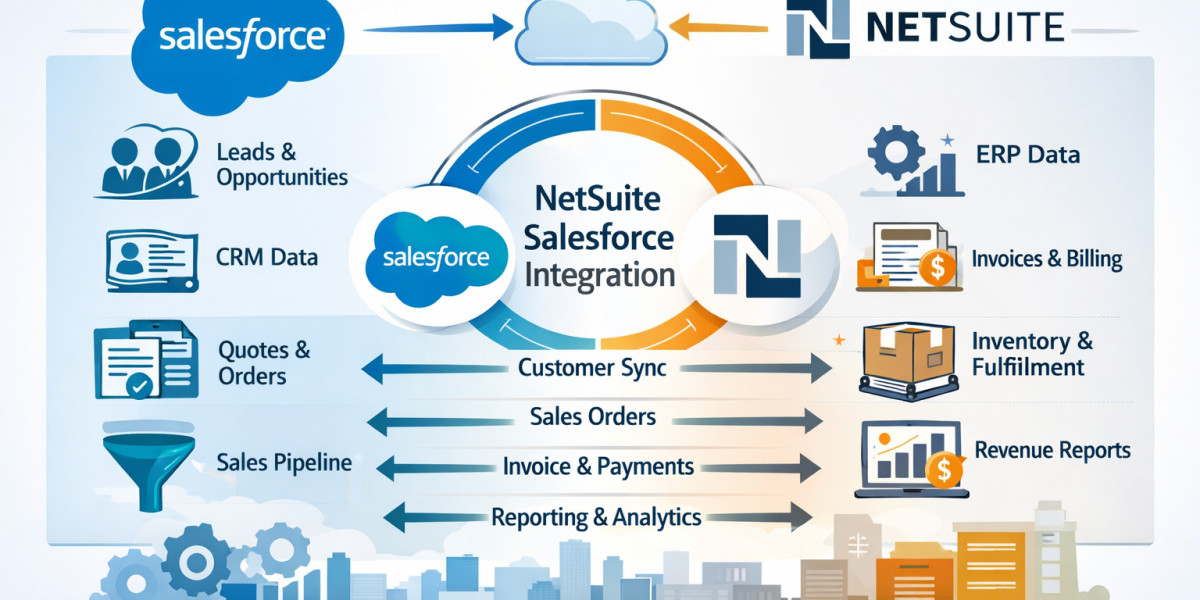

In many growing organizations, sales teams operate inside Salesforce while finance, fulfillment, and reporting live inside NetSuite. When these systems are disconnected, teams rely on spreadsheets, manual exports, and duplicated data entry. The result is delayed reporting, inconsistent forecasts, and avoidable errors.
NetSuite Salesforce integration connects CRM activity with ERP execution. It synchronizes customer records, opportunities, orders, invoices, and financial status across both platforms. This article explains what the integration covers, why it matters, common integration models, and what to consider before implementation.
What Is NetSuite Salesforce Integration?
NetSuite Salesforce integration refers to the technical connection between Salesforce (CRM) and Oracle NetSuite (ERP).
Salesforce manages leads, accounts, contacts, and opportunities. NetSuite manages orders, billing, revenue recognition, inventory, procurement, and financial reporting.
Integration ensures that:
Customer and account records stay aligned
Closed opportunities in Salesforce automatically create sales orders in NetSuite
Invoice and payment status flows back to the sales team
Product catalogs and pricing remain consistent
Revenue and forecast data reflect real-time ERP activity
Without integration, organizations operate in silos. With it, sales and finance work from the same data.
Why Businesses Need NetSuite Salesforce Integration
1. Eliminate Manual Data Entry
In disconnected environments, teams re-enter customer details, order values, and contract data across systems. This increases the risk of errors and slows down operations. Integration automates this data flow.
2. Improve Forecast Accuracy
Sales forecasts often rely on CRM opportunity stages. Finance forecasts depend on booked revenue and billing schedules. Integration aligns pipeline data with actual financial commitments.
3. Accelerate Order-to-Cash
When an opportunity closes in Salesforce, integration can automatically generate:
Sales Orders
Invoices
Revenue schedules
Subscription records
This reduces administrative delays and shortens the billing cycle.
4. Enhance Customer Visibility
Sales representatives gain visibility into:
Invoice status
Payment history
Credit limits
Outstanding balances
This allows informed discussions with customers without requesting finance reports.
What Data Typically Syncs?
A well-structured NetSuite Salesforce integration includes bidirectional synchronization across the following entities:
| Salesforce Object | NetSuite Record |
|---|---|
| Accounts | Customers |
| Contacts | Contacts |
| Opportunities | Sales Orders |
| Products | Items |
| Price Books | Pricing |
| Quotes | Estimates |
| Contracts | Subscription / Revenue records |
| Invoice Status | Billing records (back to CRM) |
The exact scope depends on business complexity, subscription models, and industry requirements.
Integration Approaches
There are three primary methods to implement NetSuite Salesforce integration.
1. Native or Pre-Built Connectors
Some integration partners offer packaged connectors designed specifically for Salesforce and NetSuite. These reduce development effort and accelerate deployment.
Pros:
Faster implementation
Lower technical complexity
Pre-configured mappings
Cons:
Limited customization flexibility
2. iPaaS (Integration Platform as a Service)
Platforms such as Celigo, Boomi, or MuleSoft provide configurable middleware to connect Salesforce and NetSuite.
Pros:
Scalable architecture
Advanced workflows
Custom transformation logic
Cons:
Requires integration expertise
Ongoing monitoring required
3. Custom API-Based Integration
Both Salesforce and NetSuite provide APIs. Organizations with internal development teams may build custom integrations.
Pros:
Full control
Highly customized workflows
Cons:
Higher development cost
Long-term maintenance responsibility
Common Use Cases
B2B Distribution
Sync large product catalogs
Transfer complex pricing rules
Push orders directly into fulfillment workflows
Subscription-Based Businesses
Convert CRM contracts into recurring billing schedules
Align revenue recognition with finance rules
Sync subscription status updates back to CRM
Professional Services
Convert opportunities into projects
Transfer billing milestones
Track revenue realization against pipeline
Key Implementation Considerations
1. Data Governance
Before integrating, organizations must standardize:
Naming conventions
Customer hierarchy
SKU mapping
Tax codes
Poor data hygiene will create sync conflicts.
2. Ownership Alignment
Integration projects require collaboration between:
Sales operations
Finance
IT
Implementation partners
Clear ownership prevents scope drift and delays.
3. Sync Direction Rules
Not all data should flow both ways. For example:
Financial records should originate in NetSuite
Opportunity stage updates should originate in Salesforce
Defining system-of-record rules is critical.
4. Error Monitoring
Even automated integrations require monitoring dashboards and exception reporting to resolve data mismatches.
Measurable Business Impact
Organizations that successfully implement NetSuite Salesforce integration typically report:
Reduced order processing time
Fewer billing disputes
Improved DSO (Days Sales Outstanding)
Higher forecast reliability
Better executive reporting accuracy
More importantly, sales and finance operate from a unified dataset rather than conflicting reports.
When Is the Right Time to Integrate?
You should evaluate integration if:
Sales and finance teams rely on spreadsheets to reconcile data
Closed deals require manual ERP entry
Invoice status is invisible to sales
Reporting discrepancies occur during monthly close
Revenue recognition depends on CRM data
Growing companies often reach a point where operational scale demands system connectivity.
Final Thoughts
NetSuite Salesforce integration is not just a technical upgrade. It is an operational alignment strategy. It connects customer acquisition to revenue realization and ensures every department works from the same source of truth.
For organizations using Salesforce to manage pipeline and NetSuite to manage finance, integration bridges the revenue lifecycle from lead to cash. When implemented correctly, it improves visibility, reduces manual work, and strengthens cross-functional collaboration.
If your teams operate across both platforms, evaluating integration is not optional. It is a necessary step toward scalable, controlled growth.


